.png)
Download GCal for Google Calendar for Mac: The ultimate Mac scheduling tool
GCal for Google Calendar is a tool developed to provide easy access to Google Calendar without the need to open a browser. If you manage important calendars on Google, this tool has been designed to provide a native experience for Mac users, allowing you to create, organize, and maintain Google Calendars from your Mac menu bar or Dock. Featuring a responsive design and user-friendly interface, GCal for Google Calendar aims to improve the calendar management experience for Mac users. Once you download GCal for Google Calendar for Mac, you get a desktop toolkit to help you quickly access, edit, and maintain your Google Calendars from your Mac.
Top Recommended Alternative
Key features of GCal for Google Calendar for Mac
GCal for Google Calendar lets you keep track of important events from a central location, giving you fast and instant access to your calendar without ever needing to open a web browser. You can achieve a lot with this tool, including loading one or several calendars, creating new events, editing calendar events, deleting events, exporting event details, and more. To help you achieve this, GCal for Google Calendar comes with a host of features, including:
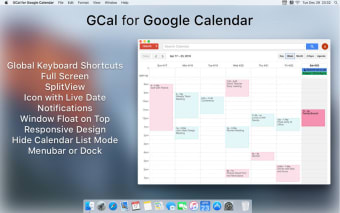
- Instant access: GCal’s instant access feature lets you quickly open your Google Calendar from your Mac’s menu bar, Dock, or global hotkey, giving you quick access to your schedule.
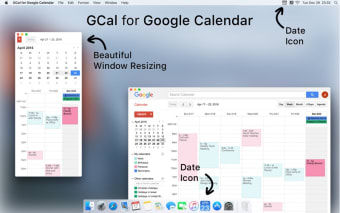
- Responsive design: GCal offers a smooth user experience with adjustable window sizes, including a compact mode for minimal screen intrusion.
- Easy event management: This feature lets you quickly add, edit, or share events and event details directly from the GCal app.
- Trackpad gestures: Trackpad gestures for GCal allow you to easily browse through different time periods on your Google Calendar using intuitive swipe gestures on your trackpad.
- Advanced notifications: The GCal app supports advanced notifications that let you stay on top of your schedule. These customizable notifications support added functionalities like snoozing events and direct links to join meetings.
- Multiple account support: GCal for Google Calendar allows you to manage multiple Google Calendar accounts simultaneously, allowing you to manage your personal and professional schedules from a convenient central location. You can also easily switch between calendars.
- Floating window: This feature lets you open the GCal app and keep it open and floating above other applications for constant visibility.
- Global hotkey: This feature lets you use a hotkey to open the app and create events instantly.
- Stunning design: GCal for Google Calendar features a visually appealing and user-friendly interface, ensuring the best of both form and function.
Effortless meeting access with GCal for Google Calendar for Mac
GCal for Google Calendar streamlines the process of joining virtual meetings by providing seamless integration with major video conferencing platforms like Google Meet, Zoom, Microsoft Teams, and more. Designed to improve efficiency and convenience, it ensures you will never miss a meeting for school, work, or personal commitments. Here are some of the key features that ensure effortless meeting access on the GCal app:
- One-click join: This GCal feature lets you quickly join a scheduled meeting from the menu bar or Dock, eliminating the need to comb through emails for links.
- Smart meeting detection: GCal automatically detects and notifies you of upcoming meetings in your Google Calendar, ensuring you always stay on top of your schedule.
- Integration with video conferencing platforms: GCal for Google Calendar integrates with major video conferencing platforms, including Zoom, Google Meet, and Microsoft Teams.
- Flexible joining options: This GCal feature lets you choose how to join a meeting—either through web-based or native apps on your desktop. For example, you can enter a Zoom meeting through the application on your PC instead of a browser.
- Notification-based access: This feature works with GCal’s Advanced Notifications feature, allowing you to get meeting reminders with direct join links embedded.
- Browser assignment: GCal is highly customizable, allowing you to assign specific web browsers or apps to manage different conferencing platforms according to your preference.
Customizing GCal for Google Calendar for Mac
The GCal app for Mac goes beyond basic scheduling and event management. The app offers various customization options and features to enhance aesthetics and functionality, allowing users to personalize their calendar experience to their preferences. These features include:
- Dock icons: Customize your calendar experience with 35 customizable Dock icons, each displaying the date, day, month, and week number.
- Menu bar icons: GCal provides over 30 menu bar icons, each showing date, day, month, and week number.
- Dark mode and themes: GCal offers a dark mode for an eye-friendly interface and eight additional themes for a more personalized look.
- Advanced calendar management tools: These tools let you manage your calendar beyond everyday tasks like event and meeting creation. With these tools, you can merge identical events to reduce clutter, hide past events to only see what’s coming, or highlight weekends for better organization.
- Weather calendar: Users running macOS 13 or later can use this feature to add a weather calendar and keep track of upcoming weather alongside their schedule.
Why download GCal for Google Calendar for Mac
GCal for Google Calendar offers Mac users a fast and efficient way to manage their Google Calendar from their desktops. It is designed to bring the full functionality of Google Calendar to Mac PCs. Thanks to its many features, seamless integrations, and user-centric design, the GCal app stands out as a valuable tool for anyone looking to improve their time management and productivity on macOS. Some of the benefits of the GCal app include:
- It offers an attractive, straightforward, and user-friendly interface.
- The GCal app allows you to manage your calendar and those shared with you.
- It is the closest thing to a native Google Calendar app for Mac.
- It allows users to switch between Google accounts easily.
- It offers a dark mode and themes for personalization.
- It is highly customizable.
.png)






.webp)






.webp)
.webp)

.jpg)